
Interface Layout
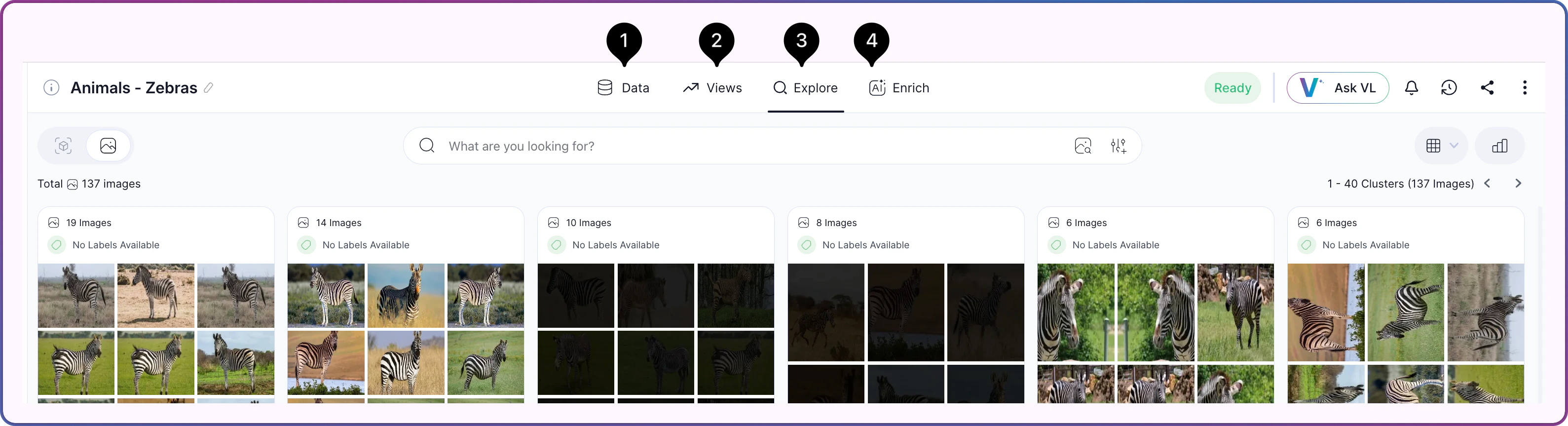
The dataset workspace is divided into four tabs. Each tab hosts a distinct set of controls, panels, and actions, and each has its own reference page.| # | Tab | Description |
|---|---|---|
 | Data | The dataset’s setup and status surface — creation checklist, media preview, and activity log |
 | Views | Saved combinations of filters and search queries, plus monitoring and sharing controls |
 | Explore | The primary workspace for viewing and analyzing dataset content — clusters, search, filters, quality signals, and selection |
 | Enrich | Model selection and progress tracking for AI-driven enrichment of the dataset |
Related Resources
Exploring Datasets
High-level orientation to the dataset workspace and the exploration workflow
How Search & Filter Work
Concepts behind semantic search, visual similarity, and quality signals
How to Search & Filter
Step-by-step guide to running searches and filters
About the Dataset Inventory
The home page you land on before opening a dataset